
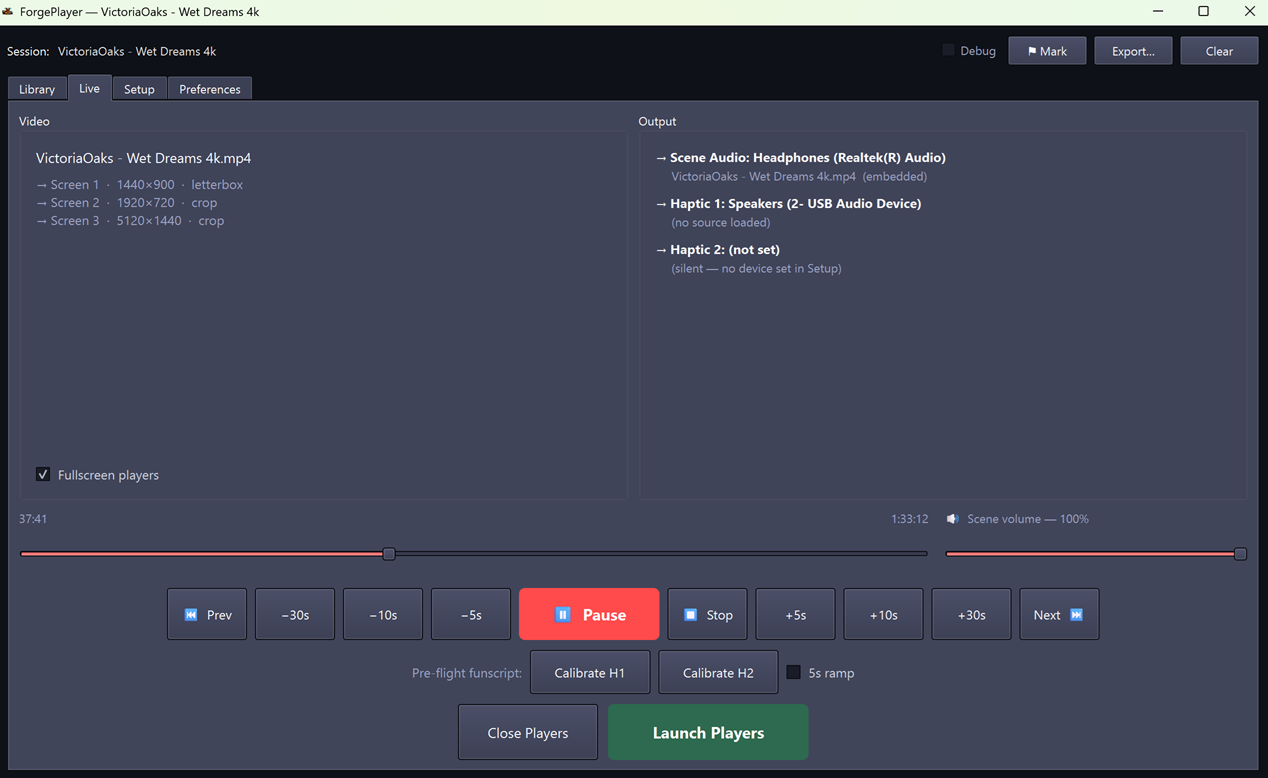
One seek bar.
Every screen. Every device.

Play a video on your 4K monitor. Scene audio to your speakers. Stim audio to your USB dongle. A prostate channel to a second dongle. Haptics to whatever you have plugged in. All driven by the same pack, all synced to the same timestamp.

Download for Windows Download for macOS Download for Linux

Latest release  ·  Free  ·  No Python required  ·  Open source

Pre-release software. Provided as-is, without warranty of any kind. Use at your own risk.

What it does

One pack drops in. Everything plays together.

Synchronized multi-screen video

libmpv pipeline with shared decoder and one render context per screen — every monitor stays frame-locked through play, seek, chapter jumps, and loops.

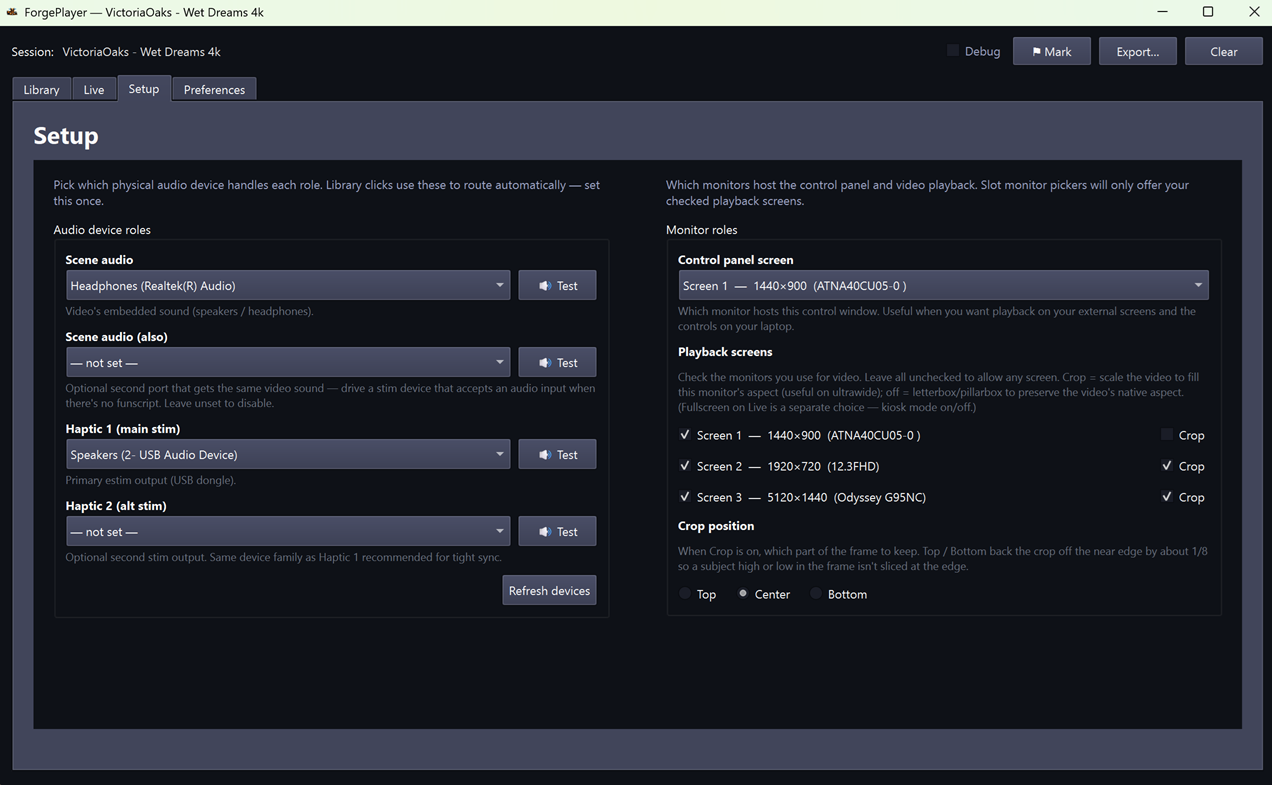
Per-port device routing

Scene audio to your speakers, stim audio to a USB dongle, a prostate channel to a second dongle, haptics to whatever you have. Separate volume per port.

Dual-port stim with prostate channel

Haptic 1 carries the main stim. Haptic 2 plays a prostate-specific track when the pack provides one — frame-perfect mirror of Haptic 1 otherwise.

Sound or live funscript synth

Pick whether ForgePlayer prefers pre-rendered stim audio (mp3) or synthesizes a funscript live via the embedded restim engine. Falls back gracefully when only one is available.

Clean stim audio

Multi-block envelope ramping, post-seek settle hold, and WASAPI exclusive mode on Windows keep the stim stream pop-free across play, pause, seek, and stop.

Drop a folder. Hit play.

Scene packs from FunscriptForge or ForgeAssembler load directly. Library auto-discovers MP4 + funscript + prostate-audio variants. Local-only — no cloud, no account, no telemetry.


How it works

Four steps from cold start to synced playback.

1

Pick devices in Setup

Wire your scene audio output, Haptic 1, and (optionally) Haptic 2 dongle. Calibrate each port with a built-in test tone.

2

Scan a library folder

Point Library at any folder of scene packs. ForgePlayer discovers video, funscripts, stim audio, and prostate variants automatically.

3

Click a scene

Single-click activates a scene; the Live tab fills with the timeline, per-port routing, and the source labels for each haptic channel.

4

Play

One seek bar drives every screen and every device. Scrub freely — synth, audio file, and video all stay in sync.


System requirements

Standalone app — no Python, no mpv install, no dependencies.

MinimumRecommended
OSWindows 10 (64-bit) · macOS 10.15 Catalina · Linux x86-64Windows 10/11 · macOS 12+ · Ubuntu 24.04 LTS
Display1920 × 10804K + a second monitor (the multi-screen story shines)
AudioBuilt-in output for scene audioOne USB audio dongle for stim — two if you want a prostate channel
RAM8 GB16 GB or more
GPUAny GPU with OpenGL 3.3Discrete GPU for HDR pass-through and high-bitrate scaling
libmpvBundled — no install required
PythonNot required — standalone installer

More from Liquid Releasing

The rest of the family — what feeds ForgePlayer, and what it pairs with.

FunscriptForge

FunscriptForge

Structure-aware funscript post-processor. Builds the multi-channel scene packs ForgePlayer plays — main funscript, alpha-prostate, pre-rendered stim audio, and the rest.

ForgeAssembler

ForgeAssembler

Concatenate many FunscriptForge clips into one long combined output — MP4 with chapter markers, every funscript channel in lockstep, fade-to-black joiners. Build longer ForgePlayer-ready packs from short clips.

ForgeYT

ForgeYT

Paste a YouTube URL, get the audio file on your disk. MP3, M4A, Opus, or WAV with embedded title and cover art. Useful for grabbing music beds for ForgeAssembler or reference audio for FunscriptForge.

Ready to play?

Download the latest release, extract, and run. No install wizard, no registry entries.

Pre-release software. Provided as-is, without warranty of any kind. Use at your own risk.
All releases on GitHub →